

Change one choice at a time and keep a note of it. That is how an estimate starts to explain the project instead of just displaying a total.DT · Owner, BH Builders
Pick your calculator
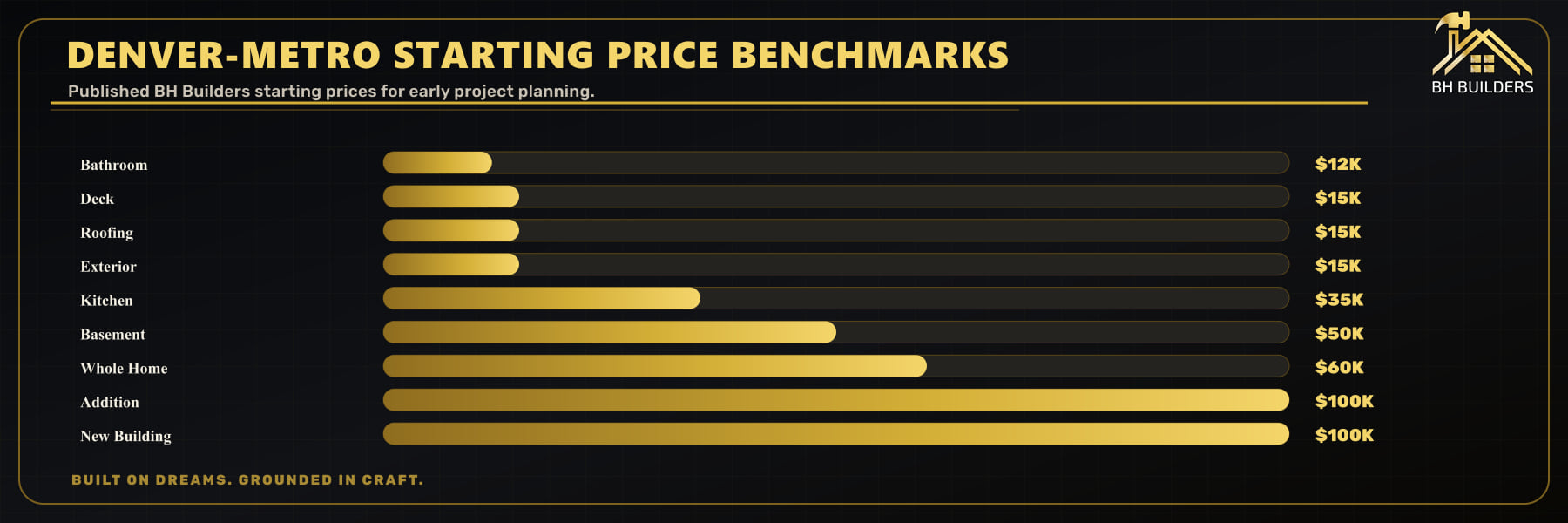
Start with the kind of work you are considering. The nine tabs below open different questions for different projects. I would run the closest version of your plan first, then change one option at a time to see what it does to the estimate.
Still deciding where to start? The free Quick Estimate offers a shorter set of planning questions.
How to use an estimate without mistaking it for a quote
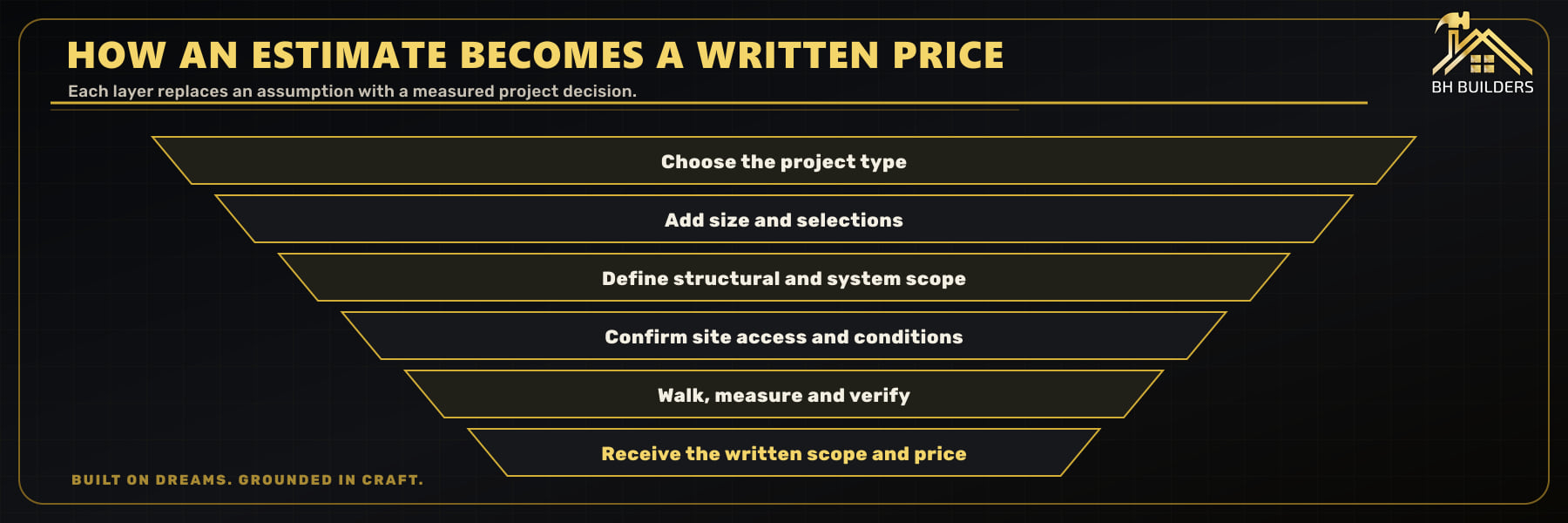
I would use these tools to compare choices before a walkthrough. Start with the room you have, enter the size as carefully as you can, and choose the work you actually intend to do. A calculator cannot see a damaged subfloor, trace a drain or decide whether a wall carries a load. Those unknowns need a site visit before I can put a complete scope in writing.
- Choose the project. Use the matching tab above. For an ADU, choose New Building; for work inside several existing rooms, start with Whole-Home.
- Enter the existing conditions. Measure the space and distinguish a finish replacement from a layout change. If you do not know an answer, write it down for the walkthrough.
- Run a version you can explain. Keep the main scope fixed, then change one finish or option at a time. Otherwise you will not know what moved the estimate.
- Review the result and its assumptions. The tool asks for your name, phone and email to unlock the estimate. Read the included items and the displayed range before comparing it with another proposal.
- Bring the choices to the site visit. Keep the result with your measurements, photos and questions. The written estimate should identify the work, selections, exclusions and remaining allowances.
Choose a tool that matches the work
If you are deciding between two different projects, keep a separate estimate for each. A basement finish and a home addition may solve the same need for space, but they involve different work. I would compare what each plan gives you before comparing its total.
| Your project | Calculator tab | Useful information to gather |
|---|---|---|
| One kitchen or bathroom | Kitchen or Bathroom | Room dimensions, fixture locations and the items you want to keep |
| Rooms inside an unfinished lower level | Basement | Usable area, intended rooms, windows and any existing plumbing rough-in |
| More floor area on the house | Addition | Approximate size, intended use and whether the addition goes out or up |
| Several existing rooms | Whole-Home | Rooms included, layout changes and which systems or finishes need attention |
| Outdoor space or the outside of the house | Deck, Roofing or Exterior | Approximate area, existing materials and known repair needs |
| An ADU or separate new structure | New Building | Proposed use, floor area and what is known about the lot and utilities |
The Quick Estimate is another starting point if you want a shorter set of questions. For explanations of finishes and budget categories across the house, use the home renovation pricing guide.
Compare the choices behind the number
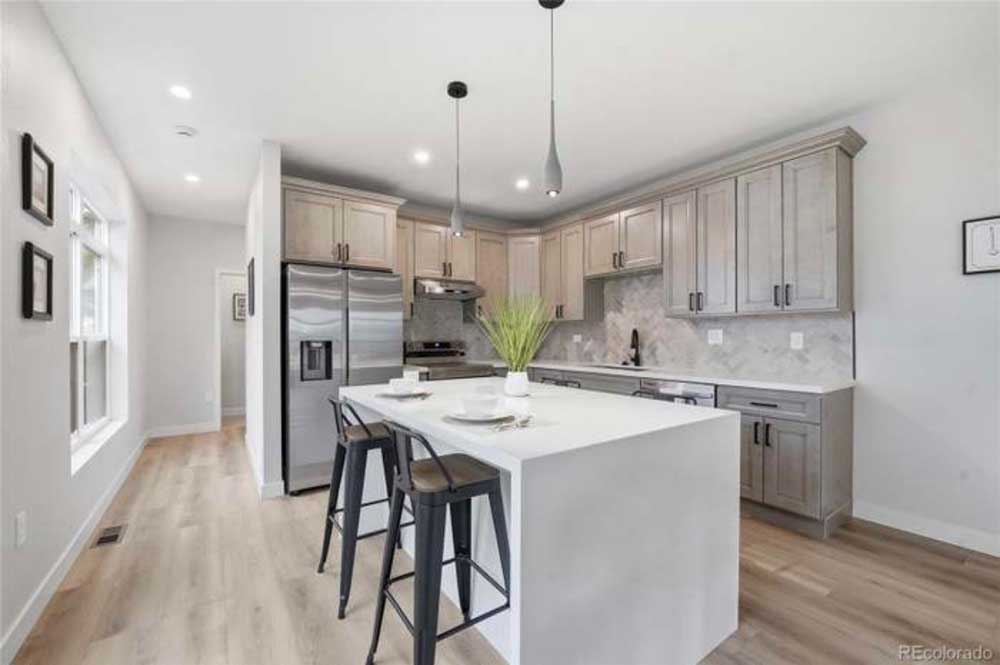
This kitchen photo from the website's project library shows several choices that belong on an estimate: the cabinets, counters, island, lighting and appliances. It does not tell you what the job cost or what work happened behind the walls. I would use a reference photo to explain the finish you want, then list the construction needed to get there.
- Keep or move: mark which sinks, appliances and walls stay in place.
- Supply or install: identify who purchases appliances and fixtures, and who checks that they fit.
- Repair or replace: name the floor, wall and ceiling finishes affected by the work.
- Known or provisional: separate selected products from allowances and concealed conditions.
Can I add two calculator totals together?
Use that sum as a conversation starter. Shared work, such as protecting the house or coordinating several trades, may overlap; other work may be missing between the two scopes. I would review the combined project before treating the sum as its budget.
What if I have not picked finishes yet?
Choose a provisional finish level and label it. Save a few examples of what you mean by that level. A named cabinet, tile or fixture gives us more to work with than a word such as premium.
Bring these four things to the walkthrough
You do not need a finished design to start. I need enough information to understand the problem you want solved and the choices that are still open.
- A short problem list. For example: two people cannot pass the open dishwasher, or basement storage blocks the equipment.
- Photos and approximate measurements. Include the whole room, its entrances and the adjacent spaces.
- Your keep-and-replace list. Note anything that must remain, from an appliance to a recently finished floor.
- Your estimate and unanswered questions. Mark assumptions rather than filling gaps with guesses.
For the detailed scope behind a project, see kitchen remodeling, bathroom remodeling, basement finishing, home additions or whole-home renovations. Those pages explain the work; this page helps you try your choices.
Serving remodeling & construction across the Denver metro
BH Builders is based in Greenwood Village and provides remodeling & construction to homeowners throughout the Denver metro and the surrounding Front Range. Wherever you are, you get the same licensed, insured crew, the same fixed written pricing, and the same standard on every job. We regularly work in these communities and the neighborhoods around them:
- Denver
- Greenwood Village
- Centennial
- Littleton
- Highlands Ranch
- Aurora
- Englewood
- Lakewood
- Parker
- Castle Rock
- Lone Tree
- Cherry Hills Village
- Arvada
- Berkley
- Brighton
- Broomfield
- Castle Pines
- Commerce City
- Federal Heights
- Foxfield
- Golden
- Ken Caryl
- Lafayette
- Louisville
- North Washington
- Northglenn
- Sherrelwood
- Thornton
- Todd Creek
- Welby
- Westminster
- Wheat Ridge
Don’t see your town on the list? If you’re anywhere in the greater Denver metro, call (720) 980-3913: there’s a good chance we serve your area, and the estimate is always free.
I want to know which choices went into the number. That gives us something useful to check when we walk through the house.DT · Owner, BH Builders
Frequently asked questions
How should I use the result?
Do I have to enter contact information to see the estimate?
Which calculator should I use for an ADU?
Who sets the calculator pricing?
Ready to review the scope?
Bring your selections and questions to a free walkthrough so we can put the scope in writing.
📞 Call (720) 980-3913 Schedule a Free Meeting